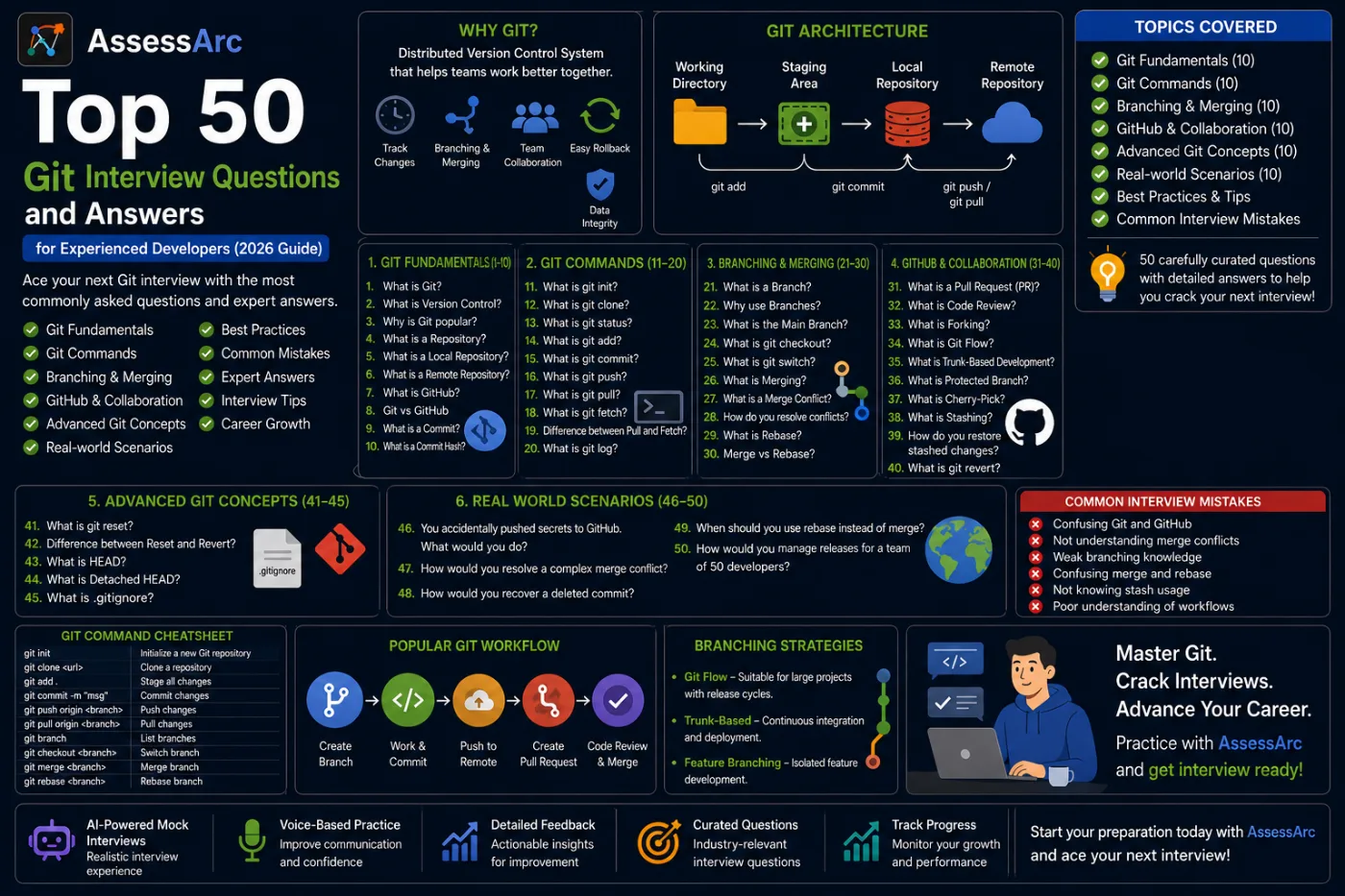
Top 50 Git Interview Questions and Answers for Experienced Developers (2026 Guide)
Prepare for Git interviews with 50 commonly asked questions covering branching, merging, rebasing, GitHub workflows, conflicts, and version control best practices.
Top 50 Git Interview Questions and Answers for Experienced Developers (2026 Guide)
Table of Contents
Git Fundamentals
Git Commands
Branching & Merging
GitHub & Collaboration
Advanced Git Concepts
Real Production Scenarios
Common Interview Mistakes
How AssessArc Helps
Conclusion
Introduction
Git is the most widely used version control system in modern software development.
Whether you're working on:
Java Applications
Spring Boot Projects
React Applications
Node.js Services
Microservices
DevOps Pipelines
Git is an essential part of the development workflow.
As a result, Git interview questions are commonly asked in interviews for:
Software Engineers
Java Developers
Full Stack Developers
DevOps Engineers
Backend Engineers
Frontend Developers
Interviewers expect candidates to understand not only Git commands but also branching strategies, collaboration workflows, merge conflicts, and production best practices.
This guide covers the top 50 Git interview questions and answers frequently asked in technical interviews.
Git Fundamentals
1. What is Git?
Answer
Git is a distributed version control system used to track changes in source code during software development.
Benefits:
✅ Version tracking
✅ Collaboration
✅ Branching support
✅ Easy rollback
✅ Distributed architecture
2. What is Version Control?
Answer
Version Control is a system that tracks changes made to files over time.
Benefits:
Change history
Team collaboration
Rollback support
Branching and merging
3. Why is Git Popular?
Answer
Git is popular because it is:
Fast
Distributed
Reliable
Scalable
Open Source
4. What is a Repository?
Answer
A Repository (Repo) stores project files and version history.
Types:
Local Repository
Remote Repository
5. What is a Local Repository?
Answer
Stored on the developer's machine.
Contains:
Source code
Commit history
Branches
6. What is a Remote Repository?
Answer
Hosted on platforms such as:
GitHub
GitLab
Bitbucket
Allows team collaboration.
7. What is GitHub?
Answer
GitHub is a cloud platform that hosts Git repositories.
Provides:
Pull Requests
Code Reviews
CI/CD Integration
Team Collaboration
8. Git vs GitHub
Answer
Git | GitHub |
|---|---|
Version Control System | Repository Hosting Platform |
Installed Locally | Cloud Based |
Tracks Changes | Hosts Repositories |
9. What is a Commit?
Answer
A Commit represents a saved snapshot of code changes.
Example:
git commit -m "Added login feature"
10. What is a Commit Hash?
Answer
Unique identifier for every commit.
Example:
a8f7d9e12b3
Used to track changes.
Git Commands
11. What is git init?
Answer
Creates a new Git repository.
Example:
git init
12. What is git clone?
Answer
Copies an existing repository locally.
Example:
git clone https://github.com/company/project.git
13. What is git status?
Answer
Shows:
Modified files
Staged files
Untracked files
14. What is git add?
Answer
Moves changes to the staging area.
Example:
git add .
15. What is git commit?
Answer
Stores staged changes in repository history.
Example:
git commit -m "Bug fix"
16. What is git push?
Answer
Uploads local commits to remote repository.
Example:
git push origin main
17. What is git pull?
Answer
Downloads and merges changes from remote repository.
Example:
git pull origin main
18. What is git fetch?
Answer
Downloads changes without merging.
Safer than pull when reviewing updates.
19. Difference Between Pull and Fetch
Answer
git pull | git fetch |
|---|---|
Fetch + Merge | Fetch Only |
Updates Working Tree | No Merge |
20. What is git log?
Answer
Displays commit history.
Example:
git log
Branching & Merging
21. What is a Branch?
Answer
A branch is an independent line of development.
Allows developers to work without affecting the main codebase.
22. Why Use Branches?
Answer
Benefits:
Feature development
Bug fixes
Experimentation
23. What is the Main Branch?
Answer
Primary branch of the repository.
Common names:
main
master
24. What is git checkout?
Answer
Switches branches.
Example:
git checkout feature-login
25. What is git switch?
Answer
Modern alternative to checkout.
Example:
git switch develop
26. What is Merging?
Answer
Combines changes from one branch into another.
Example:
git merge feature-login
27. What is a Merge Conflict?
Answer
Occurs when Git cannot automatically combine changes.
Usually happens when multiple developers modify the same code.
28. How Do You Resolve Merge Conflicts?
Answer
Steps:
Identify conflicting files
Manually resolve changes
Stage files
Commit merge
29. What is Rebase?
Answer
Moves commits to a new base commit.
Example:
git rebase main
Creates a cleaner history.
30. Merge vs Rebase
Answer
Merge | Rebase |
|---|---|
Preserves History | Cleaner History |
Extra Merge Commit | Linear History |
GitHub & Collaboration
31. What is a Pull Request (PR)?
Answer
A Pull Request proposes code changes before merging.
Benefits:
Code reviews
Quality control
Team collaboration
32. What is Code Review?
Answer
Reviewing code before merging into the main branch.
Purpose:
Improve quality
Catch bugs
Share knowledge
33. What is Forking?
Answer
Creates a personal copy of another repository.
Common in open-source development.
34. What is Git Flow?
Answer
Popular branching strategy using:
main
develop
feature
release
hotfix
branches.
35. What is Trunk-Based Development?
Answer
Developers frequently merge into a single main branch.
Common in modern DevOps environments.
36. What is Protected Branch?
Answer
Prevents direct changes to important branches.
Example:
main
Usually requires Pull Requests.
37. What is Cherry-Pick?
Answer
Applies a specific commit to another branch.
Example:
git cherry-pick commit-id
38. What is Stashing?
Answer
Temporarily saves uncommitted changes.
Example:
git stash
39. How Do You Restore Stashed Changes?
Answer
Example:
git stash pop
40. What is git revert?
Answer
Creates a new commit that reverses previous changes.
Safe for shared repositories.
Advanced Git Concepts
41. What is git reset?
Answer
Moves HEAD to a previous commit.
Types:
Soft
Mixed
Hard
42. Difference Between Reset and Revert
Answer
Reset | Revert |
|---|---|
Rewrites History | Preserves History |
Dangerous on Shared Branches | Safer |
43. What is HEAD?
Answer
HEAD points to the current commit.
Represents your current working position.
44. What is Detached HEAD?
Answer
Occurs when HEAD points directly to a commit instead of a branch.
45. What is .gitignore?
Answer
Specifies files Git should ignore.
Example:
target/
node_modules/
.env
Real Production Scenario Questions
46. You Accidentally Pushed Database Passwords to GitHub. What Would You Do?
Answer
Immediate actions:
Revoke credentials
Generate new credentials
Remove secrets from history
Force push cleaned history
Security should be the first priority.
47. How Would You Resolve a Complex Merge Conflict?
Answer
Steps:
Analyze changes carefully
Communicate with developers
Resolve logically
Test thoroughly
48. How Would You Recover a Deleted Commit?
Answer
Use:
git reflog
Locate commit and restore it.
49. When Should You Use Rebase Instead of Merge?
Answer
Use Rebase when:
Clean history is important
Feature branches are private
Linear commit history is preferred
50. How Would You Manage Releases for a Team of 50 Developers?
Answer
Best practices:
Protected branches
Pull Requests
Release branches
CI/CD pipelines
Automated testing
Common Git Interview Mistakes
❌ Confusing Git and GitHub
❌ Not understanding merge conflicts
❌ Weak branching knowledge
❌ Confusing merge and rebase
❌ Not knowing stash usage
❌ Poor understanding of collaboration workflows
How AssessArc Helps You Prepare for Git Interviews
Git interviews often include scenario-based questions rather than simple command definitions.
AssessArc helps developers practice:
Git Questions
GitHub Workflow Questions
Branching Scenarios
DevOps Interviews
Real Production Discussions
through AI-powered mock interviews, voice-based interactions, and detailed performance reports.
Conclusion
Git is one of the most important tools for modern software development.
Understanding repositories, commits, branching, merging, rebasing, GitHub workflows, and collaboration strategies can significantly improve your interview performance.
Master these Git interview questions, practice explaining concepts clearly, and you'll be well-prepared for your next software engineering interview.